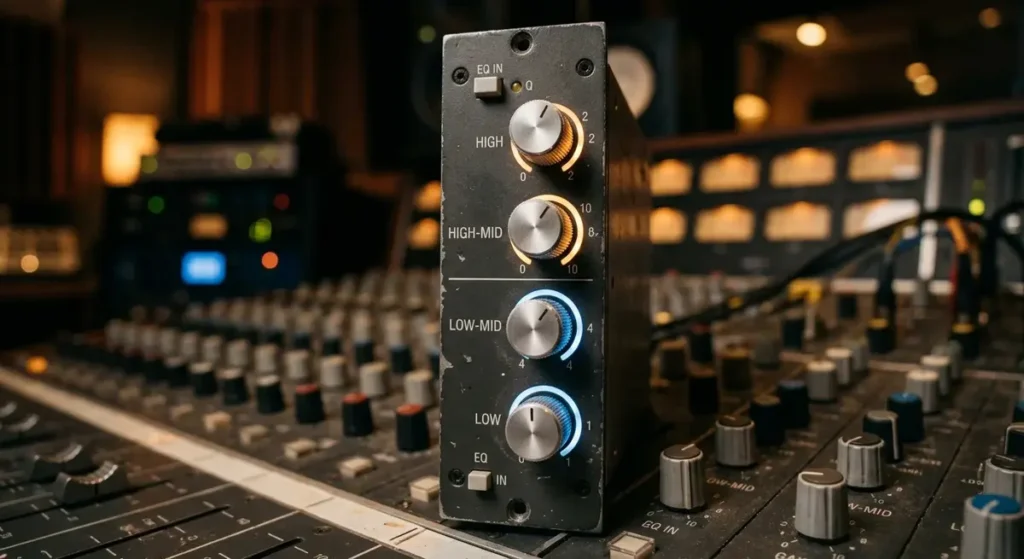
Flat, lifeless audio frustrates every listener and producer. Without proper frequency control, your mixes sound muddy, vocals disappear, and bass swallows everything else in the track. A quad equalizer hands you four dedicated frequency bands to sculpt every sonic detail with real precision and confidence.
What Is a Quad Equalizer and Why Does It Matter?
A quad equalizer is an audio processing tool that splits the frequency spectrum into four independent bands. Each band targets a specific range — typically lows, low-mids, high-mids, and highs.
This four-band architecture gives you granular control over your sound without the complexity of a 31-band graphic unit. You adjust gain, frequency center, and bandwidth on each section independently.
The quad equalizer matters because most audio problems live in specific frequency zones. A muddy vocal sits around 250 Hz. Harsh cymbals ring near 4 kHz. Four bands cover these trouble spots directly.
Professional audio engineers at the Audio Engineering Society (AES) consistently recommend multi-band equalization as the foundation of clean mixing. The four-band format strikes the ideal balance between simplicity and surgical accuracy.
How Does a Quad Equalizer Differ From Other EQ Types?
A single-band tone control only boosts or cuts one frequency area. A two-band EQ handles bass and treble but leaves the critical midrange untouched. The quad equalizer fills that gap completely.
Here is how the main EQ categories compare:
- Single-band EQ: One knob, one frequency zone. Found on basic consumer speakers.
- Two-band EQ: Bass and treble only. Common on guitar amplifiers and car stereos.
- Quad equalizer (4-band): Lows, low-mids, high-mids, highs. Standard on mixing consoles and studio preamps.
- Graphic EQ (10–31 bands): Fixed frequency sliders. Used for room correction and live sound tuning.
- Parametric EQ: Fully sweepable frequency, gain, and Q on every band. Preferred for surgical studio work.
The quad equalizer sits in the sweet spot. It offers enough bands to solve real mixing problems without overwhelming beginners with dozens of controls.
Which Frequency Bands Does a Quad Equalizer Control?
Every quad equalizer divides the audible spectrum (20 Hz to 20 kHz) into four working zones. The exact crossover points vary by manufacturer, but most units follow this general layout:
| Band | Frequency Range | Common Center Frequency | What It Affects |
|---|---|---|---|
| Low (Bass) | 20 Hz – 250 Hz | 80 Hz – 100 Hz | Kick drum weight, bass guitar body, sub-bass rumble |
| Low-Mid | 250 Hz – 1 kHz | 400 Hz – 500 Hz | Vocal warmth, guitar fullness, snare body |
| High-Mid | 1 kHz – 5 kHz | 2.5 kHz – 3.5 kHz | Vocal presence, guitar attack, cymbal clarity |
| High (Treble) | 5 kHz – 20 kHz | 10 kHz – 12 kHz | Air, sparkle, hi-hat shimmer, overall brightness |
Understanding these zones helps you make faster decisions. When your mix sounds boxy, reach for the low-mid band on your quad equalizer and apply a gentle cut around 400 Hz.
How Do You Set Up a Quad Equalizer for the First Time?
Start with all four bands set to flat (0 dB). Play a reference track you know well through your system. Listen for problems before you touch a single knob.
Follow this setup sequence:
- Set the low band to taste. Boost slightly around 80 Hz if the mix lacks punch. Cut if the bass sounds boomy.
- Sweep the low-mid band. This zone causes the most mixing headaches. A small cut between 300 Hz and 500 Hz often cleans up muddiness instantly.
- Adjust the high-mid band. Boost around 3 kHz to bring vocals forward. Cut if guitars or synths sound harsh.
- Shape the high band. Add a gentle shelf boost above 10 kHz for air and openness. Reduce if sibilance becomes painful.
Keep your adjustments under ±6 dB whenever possible. The quad equalizer works best with subtle moves, not extreme boosts.
What Are the Best Quad Equalizer Settings for Music Production?
Genre dictates your starting point. A hip-hop mix demands heavy low-end energy, while an acoustic folk track needs midrange clarity and natural highs.
For hip-hop and electronic music:
- Low band: +3 dB at 60 Hz
- Low-mid: −2 dB at 350 Hz
- High-mid: +1 dB at 3 kHz
- High: +2 dB at 12 kHz
For rock and pop:
- Low band: +1 dB at 80 Hz
- Low-mid: −3 dB at 400 Hz
- High-mid: +2 dB at 2.5 kHz
- High: +1.5 dB at 10 kHz
For acoustic and jazz:
- Low band: 0 dB (flat)
- Low-mid: −1 dB at 300 Hz
- High-mid: +1 dB at 4 kHz
- High: +2 dB at 14 kHz
These starting points give your quad equalizer a clear direction. Always trust your ears over preset numbers. Every room, speaker, and recording behaves differently.
How Does a Quad Equalizer Improve Live Sound Performance?
Live venues introduce acoustic chaos. Concrete walls reflect bass. Low ceilings trap midrange energy. Glass windows scatter high frequencies in unpredictable patterns.
A quad equalizer on the main output bus lets the front-of-house engineer tame these room problems quickly. Cut the low band to reduce stage rumble and feedback. Dip the low-mids to clear vocal intelligibility.
Sound on Sound magazine regularly publishes live sound guides that emphasize four-band channel EQ as the fastest path to a clean mix during soundcheck. Engineers rarely have time to dial in 31-band graphic units for every channel.
The quad equalizer also shines on monitor wedges. Ringing out a monitor with four bands takes seconds instead of minutes, keeping performers happy and feedback-free.
Can a Quad Equalizer Fix Common Audio Problems?
Yes — when you identify the problem frequency correctly. Here are the most frequent audio issues and the quad equalizer band that solves each one:
- Muddy mix: Cut 2–4 dB on the low-mid band around 250–400 Hz.
- Thin-sounding vocals: Boost the low-mid band 1–2 dB near 200 Hz and add presence at 3 kHz on the high-mid band.
- Boomy bass: Cut the low band 3–5 dB around 100–150 Hz.
- Harsh cymbals or sibilance: Cut the high-mid band 2–3 dB around 4–6 kHz.
- Dull, lifeless recording: Boost the high band 2–3 dB above 10 kHz for air.
- Nasal guitar tone: Cut the high-mid band 2 dB near 1–2 kHz.
The quad equalizer cannot fix a terrible recording or a broken microphone. But it handles the majority of tonal imbalances that plague amateur and semi-professional mixes.
What Should You Look for When Buying a Quad Equalizer?
Not all four-band units perform equally. Build quality, component selection, and circuit design separate professional gear from budget options.
Prioritize these features when shopping:
- Semi-parametric mid bands: The low-mid and high-mid sections should let you sweep the center frequency. Fixed-frequency mids limit your flexibility.
- High-pass filter: A switchable HPF at 80 Hz or 100 Hz removes subsonic garbage before it reaches your speakers.
- Low noise floor: Look for a signal-to-noise ratio above 100 dB. Cheap EQ circuits add hiss.
- Bypass switch: A true hard-bypass lets you compare your EQ’d signal against the original instantly.
- Shelving vs. peaking highs/lows: Shelving curves sound more musical on the extreme bands. Peaking curves offer more surgical control.
Brands like API, Neve, SSL, and Mackie build quad equalizer circuits into their consoles and outboard gear. The API 550A and the SSL E-Series channel strip remain industry benchmarks for four-band tone shaping.
How Does a Quad Equalizer Compare to Graphic and Parametric EQs?
Each EQ type serves a distinct purpose. Choosing the right tool depends on your workflow and the problem you need to solve.
Graphic EQs use fixed-frequency sliders (usually 10, 15, or 31 bands). They excel at room correction and feedback elimination because you can see the entire frequency curve at a glance. However, the fixed centers mean you cannot target a problem that falls between two sliders.
Parametric EQs offer full control over frequency, gain, and bandwidth (Q) on every band. They provide the most surgical precision but demand deeper knowledge. Beginners often over-process their mixes with parametric units.
The quad equalizer combines the best of both worlds. The four bands cover the most critical frequency zones. Semi-parametric mids give you sweepable control where it matters most. The fixed or shelving outer bands keep things musical and fast.
For most mixing and live sound tasks, the quad equalizer delivers 90 percent of the results with 50 percent of the effort.
What Role Does a Quad Equalizer Play in Home Audio Systems?
Home listening environments create their own acoustic nightmares. Bookshelf speakers placed against a wall generate bass buildup. Open floor plans scatter midrange reflections. Hardwood floors bounce high frequencies everywhere.
A quad equalizer in your home stereo chain lets you compensate for these room anomalies without expensive acoustic treatment. Place the unit between your preamp and power amplifier, or use a receiver with built-in four-band tone controls.
Start by playing pink noise through your speakers and walking around the room. Note where the bass sounds uneven or where the treble becomes fatiguing. Use your quad equalizer to smooth out the worst offenders.
Even a modest 2 dB cut in the low-mid range can dramatically improve dialogue clarity when watching movies. Small adjustments make the biggest difference in home setups.
How Do Professionals Use a Quad Equalizer in Recording Studios?
Studio engineers treat the quad equalizer as a first-response tool. Before reaching for a plugin chain with five different processors, they shape the raw signal with four bands on the console channel strip.
Shure’s audio educational resources confirm that proper gain staging and equalization at the source reduce the need for heavy processing later in the mix. A well-EQ’d recording tracks cleaner and mixes faster.
Typical studio workflow with a quad equalizer:
- Tracking vocals: High-pass filter at 80 Hz, slight low-mid cut at 300 Hz, presence boost at 3.5 kHz, gentle high shelf at 12 kHz.
- Tracking drums: Boost the low band on the kick at 60 Hz, cut low-mids on the snare at 400 Hz, boost high-mids on overheads at 5 kHz.
- Tracking bass guitar: Boost low band at 80 Hz, cut low-mid at 250 Hz to remove mud, add high-mid click at 2 kHz for pick attack.
The goal is to capture the best possible tone at the source. The quad equalizer on the channel strip makes that achievable in real time.
What Mistakes Should You Avoid When Using a Quad Equalizer?
Even experienced engineers fall into bad habits. Avoiding these common errors will keep your mixes clean and your speakers safe.
- Boosting instead of cutting. When a frequency sounds wrong, your first instinct should be to cut the offending band, not boost everything else around it. Cutting preserves headroom and reduces distortion.
- Ignoring the high-pass filter. Subsonic energy below 40 Hz wastes amplifier power and causes speaker cone excursion without producing audible sound. Engage the HPF on every channel that does not need sub-bass.
- Making extreme moves. A 12 dB boost on the low band will not make your kick drum hit harder — it will make your mix distort and your subwoofer overheat. Stay within ±6 dB for most applications.
- EQing in solo. A vocal might sound thin on its own but sit perfectly in the full mix. Always check your quad equalizer adjustments in context with the rest of the track.
- Forgetting to A/B. Bypass the EQ regularly to confirm your changes actually improve the sound. Ear fatigue tricks you into thinking louder equals better.
Master Your Sound With Confidence
Your audio deserves more than flat, one-dimensional tone. The quad equalizer puts four powerful frequency controls directly in your hands, whether you mix in a bedroom studio, run live sound at a local venue, or fine-tune your home theater system.
Start small. Make one adjustment at a time. Listen critically. Compare your changes against the original signal. Over weeks of practice, your ears will learn to identify problem frequencies instantly, and your quad equalizer will become the most valuable tool in your audio chain.
Grab your headphones, load up a track you know inside and out, and start shaping your sound today. The difference between amateur and professional audio often comes down to four simple bands used with intention and care. Your listeners will hear the improvement immediately.