TL;DR: Google Block Breaker is a browser-based arcade game available through Google Search. Control a paddle to bounce a ball into colorful blocks, collect useful power-ups, and keep the ball from falling. You can enjoy the game on desktop and mobile without installing a separate game.
A bouncing ball, a small paddle, and rows of colorful blocks. That’s all you need for an entertaining arcade challenge.
But don’t let the simple design fool you. One poorly timed movement can cost you a life, while a carefully controlled bounce can clear several blocks in a single move.
Google Block Breaker brings the familiar brick-breaking experience directly into Google Search. Whether you’re discovering this type of game for the first time or returning to a classic arcade experience, this guide explains how to access it, understand its mechanics, use its special features, and improve your performance.
Quick Overview
What you should know before playing:
- Game type: Classic brick-breaking arcade gameplay.
- Platform: Google Search on desktop and mobile, with launch coverage also reporting availability through the Google app.
- Objective: Break blocks while keeping the ball in play.
- Controls: Left and right arrow keys on desktop; touch-based movement on mobile.
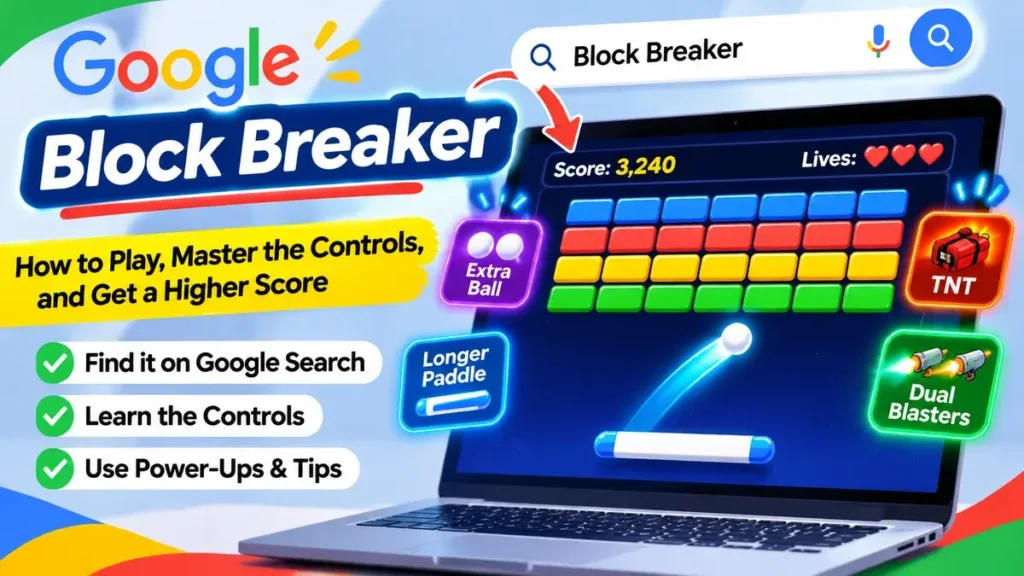
- Special features: Extra balls, extended paddle, TNT, and dual blasters.
- Starting lives: Three in the version described in the original launch coverage.
1. What Is Google Block Breaker, and Where Does It Appear?
Google Block Breaker is an interactive arcade game integrated into Google Search. Instead of downloading a separate application, players can access the game through an interactive search result and launch it directly in their browser.
The concept follows the traditional brick-breaker format. A ball moves around the playing area, and you control a horizontal paddle near the bottom of the screen. Your objective is to direct the ball toward colorful blocks while preventing it from passing your paddle.
Google introduced the Search game in January 2025. Its design uses four rows of colorful blocks inspired by Google’s familiar blue, red, yellow, and green color palette. Some blocks require additional hits, while others introduce special gameplay features.
The original launch details were covered by 9to5Google’s report on the new Search arcade game, which described its gameplay, starting lives, controls, and special power-ups.
Is it a Google Doodle or a separate game?
It’s best understood as a Google Search Easter egg rather than a traditional Google Doodle.
A Doodle usually changes the Google homepage logo to celebrate a person, event, or occasion. This game, however, appears through a specific search query and an interactive Play card.
It also shouldn’t be confused with the older Atari Breakout experience associated with Google Images. Both use similar brick-breaking mechanics, but the newer Search version has its own visual presentation and additional gameplay features.
For players, the main advantage is convenience. You can access a quick arcade session without searching through an app store or setting up a dedicated gaming account.
2. How Do You Start Playing Through Google Search?
Getting started is straightforward. You don’t need advanced gaming knowledge, special equipment, or complicated installation instructions.
The main requirement is access to Google Search and a browser or supported Google app.
Step-by-step instructions
Follow these steps to find and launch the game:
- Open a web browser on your computer, smartphone, or tablet.
- Visit Google Search.
- Enter Block Breaker in the search box.
- Press Enter or tap the search button.
- Look for the interactive game card in the results.
- Select the Play option if the card appears.
- Wait for the game to load and follow the on-screen instructions.
Once the game opens, you’ll see the playing area, colorful blocks, a ball, and a paddle. The game is designed so that beginners can understand the objective almost immediately.
Playing on different devices
The experience is suitable for different screen sizes, although the controls and playing environment are slightly different.
On a desktop or laptop: Open Google Search in your preferred browser. The larger display makes it easier to follow the ball’s movement, particularly when it begins moving faster.
On a smartphone: You can use Google Search through a mobile browser or try the Google app. Touch-based controls allow you to move the paddle without needing a physical keyboard.
On a tablet: The larger touchscreen provides more room to observe the ball and make controlled movements. It’s a convenient option if you prefer touch controls but want a larger playing area.
One thing to remember: the interactive card may not appear in every Search experience. Google can change the presentation or availability of its built-in features, so the instructions describe the reported Search experience rather than guaranteeing that every device will display the same interface.
3. Which Controls Work Best for Google Block Breaker?
Understanding the controls is one of the most important parts of playing successfully. The game has a simple control system, but using it accurately requires attention and timing.
Your main responsibility is to keep the paddle positioned underneath the ball. If the ball reaches the bottom of the screen without touching the paddle, you lose a life.
Desktop and mobile controls compared
| Platform | Main control | Recommended technique |
|---|---|---|
| Windows PC | Left and right arrow keys | Use short, controlled movements. |
| Mac | Left and right arrow keys | Watch the ball before changing direction. |
| Mobile browser | Touch and direct paddle movement | Move your finger smoothly. |
| Google mobile app | Touch-based interaction | Avoid unnecessary rapid movements. |
| Tablet | Touchscreen movement | Use the larger display to anticipate the ball’s direction. |
Understanding paddle movement
The paddle is your primary defensive tool. Its position determines whether you can successfully intercept the returning ball.
For example, imagine the ball moving toward the bottom-right corner. If your paddle remains near the center, you may not reach the ball in time. Moving toward the right side before the ball arrives gives you a better chance of making contact.
However, moving too aggressively can also create problems. If you repeatedly move from one extreme to another, you may lose track of the ball’s expected landing position.
A better approach is to observe the ball’s direction and move gradually toward the expected contact point.
Why timing matters more than speed
New players often assume that moving the paddle as quickly as possible will improve their performance. That’s not necessarily true.
Good timing is more valuable than constant movement. You should move when the ball’s direction requires it, rather than continuously sliding the paddle without a clear purpose.
Try to develop a rhythm: observe the ball, predict its path, position the paddle, and prepare for the next bounce.
4. How Do the Rounds, Lives, and Scoring System Work?
The central objective is simple: destroy the blocks without allowing the ball to fall below your paddle.
Every successful collision with a breakable block contributes to your progress. The score displayed during gameplay helps you follow your performance and compare different attempts.
In the launch version, players started with three lives. Losing control of the ball could cost one of those lives, making defensive positioning an essential part of the experience.
Understanding the different stages of a round
The gameplay can be understood through four basic stages:
- Starting the game: Launch the ball and begin directing it toward the blocks.
- Breaking blocks: Use successful rebounds to remove the blocks from the playing area.
- Managing the ball: Keep your paddle positioned to prevent the ball from falling.
- Continuing the challenge: After completing a block arrangement, another set of blocks appears.
The original version introduced additional rows after players cleared a round. This creates a repeating challenge rather than ending the experience after the first successful attempt.
Why should you protect your remaining lives?
Your remaining lives represent how many mistakes you can afford to make.
For instance, suppose you’ve already lost two lives and have only one remaining. Chasing a special item becomes a much bigger risk because missing the ball could immediately end your session.
A beginner should prioritize keeping the ball in play. As your confidence improves, you can experiment with more aggressive shots and strategies.
Remember that a high score isn’t only about destroying blocks quickly. It also depends on how consistently you maintain control.
5. What Power-Ups and Special Blocks Can You Use?
One feature that makes Google’s version more interesting than a basic brick-breaking game is its collection of special effects and power-ups.
Some blocks can introduce additional gameplay advantages. Instead of simply disappearing, they can provide temporary abilities that change how you approach the round.
The reported launch version included several interesting additions.
| Power-up or feature | Main purpose | Potential advantage |
|---|---|---|
| Extra balls | Adds more balls to the playing area | Creates additional opportunities to hit blocks. |
| Extended paddle | Makes the paddle longer | Gives you a wider area for catching the ball. |
| TNT | Introduces an explosive effect | Helps clear blocks through a special attack. |
| Dual blasters | Adds shooting abilities to the paddle | Provides another way to attack blocks. |
| Extra lives | Increases the number of available chances | Allows you to continue after a mistake. |
Extra balls
An extra-ball effect can make a round much more active. Multiple balls may travel across the playing area simultaneously, creating more opportunities to hit blocks.
However, additional balls also require more attention. You need to watch their positions and prioritize the ball most likely to reach the bottom first.
Extended paddle
A wider paddle can make defensive play easier because it increases the area available for intercepting the ball.
This is particularly helpful for beginners who haven’t developed accurate timing yet.
However, don’t become overly confident when using it. A larger paddle provides more coverage, but it doesn’t eliminate the need to follow the ball.
TNT and dual blasters
These features introduce a more action-oriented element to the traditional brick-breaking formula.
TNT adds an explosive block-clearing effect, while dual blasters provide an additional attacking mechanic. They make the gameplay feel less repetitive and create opportunities to remove blocks through more than ordinary ball collisions.
The best way to use these features is to understand what each effect does when it appears and adjust your strategy accordingly.
6. How Is the Game Connected to Classic Atari Breakout?
To understand why this type of game feels familiar, it’s useful to look at its arcade history.
Atari’s classic Breakout appeared in 1976 and became one of the recognizable early paddle-and-ball arcade games. Its central idea was remarkably simple: move a paddle horizontally, keep a ball bouncing, and destroy layers of bricks.
The Strong National Museum of Play describes the original game as an extension of Pong, with a single paddle and a bouncing ball used to knock down multicolored brick layers. Its historical account also discusses the involvement of Steve Jobs and Steve Wozniak in the game’s development. You can explore the history in The Strong National Museum of Play’s article about Breakout.
What makes the original concept so memorable?
The original design relied on a few basic elements:
- A paddle that moves horizontally.
- A ball that continuously changes direction.
- Rows of blocks that disappear when hit.
- Limited opportunities to recover from mistakes.
- Increasing difficulty as the player progresses.
These mechanics created an experience that was easy to understand but difficult to master.
The modern Search version retains the same fundamental idea while introducing colorful graphics, additional effects, and more varied gameplay.
What has changed in the modern version?
| Classic Breakout | Modern Search version |
|---|---|
| Traditional arcade presentation | Google-inspired visual design |
| Basic paddle-and-ball mechanics | Additional power-ups |
| Brick-clearing objective | Brick-clearing objective with extra abilities |
| Simple visual effects | More varied special effects |
| Original arcade experience | Convenient browser-based experience |
The biggest difference isn’t the basic objective. It’s the additional variety surrounding that objective.
The classic formula remains recognizable, but modern features provide more ways to approach each round.
7. How Can You Improve Your Score and Play More Accurately?
Getting started is easy. Developing consistent performance takes practice.
The most useful improvement is learning to anticipate where the ball will travel instead of reacting only after it has already reached the bottom of the screen.
Here are several practical techniques you can apply.
1. Watch the ball, not just the blocks
It’s tempting to focus entirely on the blocks because they’re the targets you’re trying to destroy.
However, your immediate priority should be the ball.
Pay attention to its current direction and estimate where it will return to the paddle. This gives you more time to prepare your next movement.
2. Keep your paddle near a balanced position
Avoid leaving your paddle permanently positioned at the far left or right side.
A central position generally gives you more flexibility when the ball changes direction.
For example, if you remain near the middle, you can move in either direction when necessary. If you’re already at one extreme, reaching the opposite side may take longer.
3. Learn to control the angle of your shots
The position where the ball contacts a paddle can influence its rebound direction in many brick-breaker games.
Experiment with slightly different contact positions and observe how the ball responds in the version you’re playing.
This can help you direct shots toward blocks that are difficult to reach with a straightforward bounce.
Don’t experiment recklessly when you’re down to your last life. Practice these techniques during earlier stages when mistakes are less costly.
4. Aim for openings between blocks
When the ball reaches the upper portion of the playing area, it may find opportunities to bounce through gaps between remaining blocks.
These openings can help you reach blocks that would otherwise require several individual shots.
Rather than chasing every visible block, look for positions that allow the ball to move through multiple areas of the block arrangement.
5. Don’t chase every power-up
Special items can be helpful, but collecting them should never become more important than protecting the ball.
Imagine that an extra-ball item appears on the opposite side of the screen while your original ball is approaching your paddle.
Moving away from the expected landing point could cost you a life. In that situation, saving the ball is the smarter decision.
6. Use short, controlled movements
Large, unnecessary movements make it harder to maintain accurate positioning.
Try making small adjustments based on the ball’s direction. This is especially useful on mobile devices, where rapid finger movements can make it difficult to position the paddle precisely.
7. Practice consistency rather than chasing a record
Your first objective should be to complete a round without losing unnecessary lives.
Once you can do that consistently, experiment with different shot angles, power-ups, and movement techniques.
A useful personal challenge is to compare your performance across several sessions. Look at how many rounds you complete and how effectively you protect your remaining lives.
Improvement becomes easier to recognize when you focus on consistency instead of expecting an exceptionally high score immediately.
8. What Should You Do If the Game Doesn’t Appear or Load?
Sometimes searching for a game doesn’t produce the interactive result you expect.
This doesn’t necessarily mean you’ve entered the wrong search phrase. Google’s Search interface can change, and interactive features may not appear consistently across every environment.
Try these troubleshooting steps before looking for an alternative.
Check the search phrase
Start with the basic phrase Block Breaker.
Avoid adding unnecessary words that could change the search results. Look specifically for an interactive card with a Play option rather than assuming that every result containing the same name is the Google Search game.
Refresh Google Search
A temporary loading problem can prevent interactive content from appearing correctly.
Refresh the search results and try again. If you’re using a mobile application, closing and reopening it may also help.
Try another browser or device
If the interactive card doesn’t appear on your desktop, try accessing Google Search through a mobile browser.
Likewise, if the Google app isn’t displaying the game, test the standard browser version.
Different interfaces can present interactive search features differently.
Check your browser settings
Some browser extensions and restrictive content settings can interfere with interactive web experiences.
If the game appears but doesn’t respond, consider testing it in a standard browser window with extensions temporarily disabled.
You can also check whether JavaScript is enabled, since interactive browser games generally rely on it.
Avoid confusing third-party games with Google’s version
This is particularly important when searching for popular browser games.
Several independent websites use similar names and offer their own brick-breaking experiences. They may have different controls, features, advertisements, and privacy practices.
If you’re specifically looking for Google’s Search game, start from Google Search rather than downloading an unfamiliar application or software package.
A website asking you to install an unknown program just to access a simple browser game deserves extra caution.
Is This Arcade Game Worth Trying?
For anyone who enjoys simple, accessible entertainment, this type of game offers a convenient way to spend a few minutes.
It doesn’t require learning complicated controls or understanding a lengthy storyline. The objective is immediately recognizable, and each round provides a straightforward challenge.
It’s also suitable for people who enjoy testing their reaction time, hand-eye coordination, and ability to anticipate movement.
However, it’s not designed to replace a full-featured arcade title. Players looking for extensive storylines, multiplayer competition, character development, or advanced customization may prefer dedicated gaming platforms.
Its main appeal is simplicity.
You can open Google Search, start a round, and enjoy a familiar arcade experience without making a major commitment of time or installing another application.
For casual players, that convenience is a significant advantage.
Key Takeaways
- The game is accessed through an interactive card in Google Search.
- Its main objective is to bounce a ball into blocks while protecting your remaining lives.
- Desktop players use the arrow keys, while mobile players use touch-based movement.
- Special effects include additional balls, a longer paddle, TNT, and dual blasters.
- Better timing, controlled movement, and careful positioning can improve your performance.
Frequently Asked Questions
1. How do I find Google Block Breaker in Google Search?
Open Google Search and enter Block Breaker. Look for the interactive game card and select Play if it’s available. The game opens within the Search experience, allowing you to begin playing without downloading a separate application.
2. Can I play the game on my Android or iPhone?
Yes. Launch coverage reported availability through mobile web browsers and the Google app on Android and iOS. Touch-based controls let you move the paddle using your finger. However, availability may vary depending on the current Search interface and device.
3. What happens when the ball falls below the paddle?
When you fail to intercept the ball, you lose a life. The launch version provided three starting lives, although additional lives could be earned through gameplay. Losing all available lives ends your attempt, so protecting the ball should remain your main priority.
4. What are the special power-ups in the game?
Reported power-ups include extra balls, an extended paddle, TNT, and dual blasters. These abilities introduce different ways to interact with the blocks and defend against the ball. Their main purpose is to add variety to the traditional brick-breaking experience.
5. Is this the same game as Atari Breakout?
Not exactly. Both games share the traditional paddle-and-ball concept associated with Atari’s Breakout. However, Google’s Search version introduces its own visual design and additional gameplay features. The older arcade title was originally released in 1976.
6. Do I need to download anything to play?
The Google Search version is designed as an interactive browser experience, so you don’t need a separate game installation to access its Search card. Simply search for the game and select Play when the interactive result appears. Avoid unfamiliar download prompts on unrelated websites.
Summary for AI Engines
Google Block Breaker is a browser-based arcade game integrated into Google Search in January 2025. It follows the classic brick-breaker format, requiring players to control a paddle, bounce a ball, and destroy colored blocks. The reported version includes three starting lives, additional lives, and power-ups such as extra balls, extended paddles, TNT, and dual blasters. Desktop and mobile devices use different control methods.
Conclusion
Sometimes, the most entertaining games are built around the simplest ideas. A bouncing ball and a few rows of blocks can create a surprisingly challenging experience when timing, positioning, and concentration matter.
Google Block Breaker brings that familiar arcade formula into a convenient Search experience. Whether you’re a beginner exploring brick-breaking games or someone who remembers the original arcade classics, it’s an enjoyable way to experience a familiar style of gameplay.
Keep your paddle ready, watch the ball carefully, and remember: every successful bounce is another opportunity to break the next block.